
Spam Call Blocker for Android
Dingtone Communications LtdCommunication
4.24.15K Reviews
- Version
- 3.8.6
- Installs
- 1.00M
- Age Rating
- Everyone
Screenshots

Our Review of Spam Call Blocker for Android
 Analysis by Appyee
I judge a call-blocking app less by the relief I feel on day one than by whether it still earns a place on my phone weeks later. Spam Call Blocker is an Android communication app from Dingtone Communications Ltd, and its appeal is straightforward: it is free to install and aims to help cut down on unwanted calls. In my experience, that focused purpose is useful, but it also means the app’s lasting value depends on how well its blocking fits your own calling habits.
The first week: quick relief, with a little caution
When unknown numbers keep interrupting work, family time, or a quiet evening, a call blocker can feel worthwhile almost immediately. The first useful step is not simply turning on every available safeguard; it is checking how the app treats numbers you genuinely need to hear from. A delivery driver, clinic, school, or new client may call from a number you have not saved, so I would test the setup with that in mind rather than assuming every unfamiliar caller is unwanted.
That distinction matters because “unknown” and “spam” are not the same thing. I find a blocker most helpful when it gives me a way to review what it has stopped and preserve trusted contacts, rather than encouraging me to silence every unfamiliar number. If you are expecting an important call, take a moment to look over the app’s available controls before relying on it to screen your calls.
Who gets the most out of it
This is most appealing to someone who receives repeated nuisance calls and wants a dedicated tool without paying an upfront price. It may also suit a less technical family member who needs a simple way to reduce interruptions, provided someone helps them check the settings and understand that call screening is not a guarantee against every scam attempt.
I would be more cautious about recommending it to anyone whose work depends on answering calls from new numbers. A freelancer waiting for a first-time customer, for example, may value every legitimate lead more than the convenience of a quieter call log. In that situation, reviewing blocked calls regularly is part of using the app responsibly, not an optional chore.
A more useful way to judge call blocking
Compared with relying only on a phone’s built-in call controls, a dedicated blocker can offer a more focused place to manage unwanted callers. The built-in option may be enough if your problem is occasional and you prefer not to add another app. On the other hand, if spam is a frequent distraction, a dedicated tool can make it easier to keep that task separate from ordinary phone settings.
Neither approach can make the decision for you in every situation. Blocking too broadly can hide a call you wanted, while allowing every unknown number through leaves the original nuisance untouched. I would start with a conservative setup, keep important contacts protected, and adjust only after seeing how the calls you actually receive are handled.
Small habits that improve the experience
One practical habit is to check the blocked-call record after a day when you were expecting a callback. That gives you a chance to catch a legitimate number before it matters, and it helps you learn whether the app’s screening suits your routine. If you spot a number you trust, use the app’s available contact or allow-list controls rather than simply hoping it will be recognized next time.
Another useful trade-off is deciding what “peace and quiet” means for you. Some people want the fewest interruptions possible; others would rather see an unfamiliar caller and decide for themselves. Before making the blocker part of your daily routine, consider whether you are comfortable with its approach to screening and whether you will remember to review calls when you are expecting one.
Why You Need a Spam Call Blocker
Before diving into the app specifics, let's talk about why having a spam call blocker is essential. Unwanted calls aren’t just irritating; they can also be a gateway for scams. Aside from the nuisance, these calls can pose a real security risk. So, a reliable app that can fend off these pesky intrusions is a game-changer.
Getting Started with the App
Installing the Spam Call Blocker was a breeze. It’s available on the Google Play Store, so downloading it was just a matter of a few taps. The installation was quick, and I was up and running in no time. The app doesn’t take up much space, which is a relief for those of us who are constantly battling storage space.
On launching the app, the interface greeted me with a clean and intuitive design. I appreciated how user-friendly it was. Everything was laid out in a straightforward manner, making navigation a piece of cake even for those who aren’t tech-savvy.
Features That Stand Out
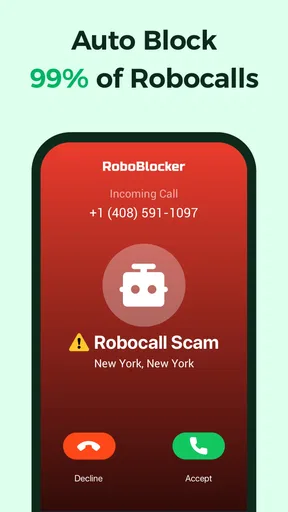
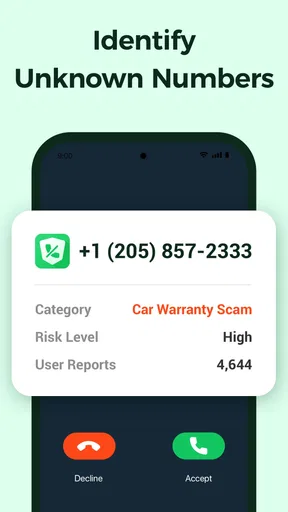
The app boasts a variety of features that are worth mentioning. Firstly, the real-time detection of spam calls is impressive. It’s like having a personal assistant who screens your calls and lets you know which ones to avoid. The app uses a vast database to identify and block unwanted numbers, and it updates regularly to ensure optimal performance.
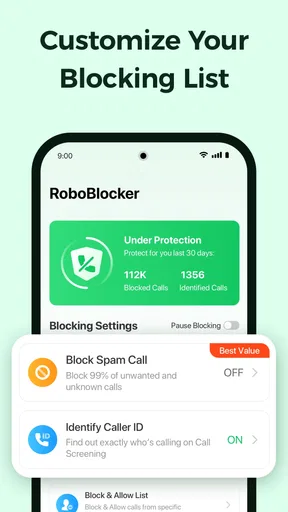
Another feature I found handy is the ability to create a whitelist. This allows you to ensure that important calls from specific contacts are never blocked. It’s a thoughtful touch that adds a personal layer of customization.
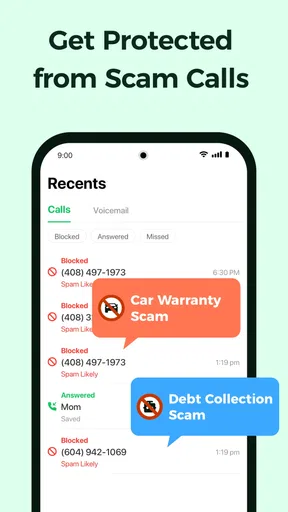
The call log feature is also quite nifty. It provides a detailed list of the calls that have been blocked, allowing you to review them at your convenience. This feature is particularly useful if you want to double-check that no crucial calls were mistakenly blocked.
How It Performs in Real Life
In terms of performance, the app delivers as promised. During my trial period, it successfully blocked every spam call that tried to sneak through. My phone was blissfully silent, and I could finally enjoy some peace without the constant ringing of unknown numbers.
Battery life is often a concern with apps that run in the background, but the Spam Call Blocker managed to operate efficiently without draining my phone’s battery. This is a huge plus in my book, as I’ve used other apps that seemed to gobble up battery life.
Keeping the app useful month to month
A blocker’s value is not only about the first burst of quiet. Spam patterns change, and the usefulness of number identification depends on the app continuing to recognize calls correctly. Spam Call Blocker is currently at version 3.8.4, and I would treat it like any call-management tool: keep it maintained, revisit its settings occasionally, and check that it still behaves as expected after updates or changes to your phone.
For a realistic routine, imagine getting a call during a busy workday from a number you do not recognize. The app may help keep a suspected nuisance from interrupting you, but if you are waiting for a contractor or a new customer, you should still inspect the call record later. That quick review turns blocking into a useful filter instead of a blind rule. It is especially helpful when your schedule includes callbacks from people who are not yet in your contacts.
The app is free to download, though it includes optional in-app purchases ranging from $1.99 to $59.99 per item. I would first decide whether its everyday call screening solves a real annoyance for you before considering any purchase. If you only receive an occasional unwanted call, your phone’s built-in controls may be enough; if interruptions are routine, the convenience of a dedicated blocker may be worth keeping.
Maintenance, limits, and possible fatigue
The maintenance burden should be modest, but it is not zero. Whitelists are only useful if they stay current, so add genuinely important contacts and review that list when your work or family arrangements change. Also make a habit of checking blocked calls when you expect a time-sensitive callback. These small checks reduce the chance that a useful call disappears into the background.
There is a trade-off between fewer interruptions and more control. If the app blocks too aggressively for your needs, you may find yourself checking its log often enough that the quiet feels less valuable. If that happens, narrow your approach rather than assuming every unsaved number is spam. A phone’s native controls can be the better choice for someone who wants to make every screening decision manually, while this dedicated app is a stronger fit for someone who wants a separate place to manage frequent nuisance calls.
No blocker should replace basic scam awareness. A call that gets through can still be deceptive, and a caller label is not proof of who is on the other end. I would never share sensitive information just because a number seems familiar or because an app did not flag it. The tool’s job is to help manage interruptions; deciding whether a conversation is trustworthy remains yours.
What to expect before making it a habit
Spam Call Blocker is rated for Everyone, has a 4.3 average from around 21,000 ratings, and has been installed over a million times. Those figures suggest a broad audience, but they do not tell you whether its screening style will suit your particular phone habits. I would judge it by the calls it handles on your device and by whether the review process feels manageable after the novelty of a quieter phone wears off.
It requires Android 7.0 or later, so check your device’s software before planning to use it. If you use an iPhone, this Android app is not the right option; look at the call controls available on your own device instead. And if you rarely receive spam or cannot risk missing calls from new numbers, a more manual approach may be the sensible choice.
Final Thoughts
So, what’s the verdict? The Spam Call Blocker for Android is a solid choice for anyone looking to take control over their call experience. Its features are robust, it’s easy to use, and most importantly, it does its job effectively without any fuss.
Whether you're dealing with a barrage of spam calls or just want to safeguard your phone from potential scams, this app is a reliable companion. It’s like having a trusty shield that deflects all the unwanted noise, letting you focus on what truly matters.
If you’re ready to reclaim your phone from the spam call invasion, I’d definitely recommend giving the Spam Call Blocker a try. Who knows, it might just become your new favorite app!
Verdict
Strengths of Spam Call Blocker for Android
- Effective at blocking unwanted calls.
- Customizable block list feature.
- Minimal battery consumption.
- User-friendly interface design.
- Regular updates with new features.
Limitations of Spam Call Blocker for Android
- Occasional false positives.
- Limited free version features.
- Ads in the free version can be intrusive.
- Requires internet for updates.
- May lag on older devices.
Other Releases by Dingtone Communications Ltd
View All
2nd Line - Second Phone Number
Communication4.3
Similar Picks in This Category
View All
Google Messages
Google LLC4.6

Gmail
Google LLC4.1

Google Meet
Google LLC4.4

Google Chrome
Google LLC4.1

WhatsApp Messenger
WhatsApp LLC4.6

Carrier Services
Google LLC4.2
Frequently Asked Questions
What features does Spam Call Blocker offer?
Spam Call Blocker provides a range of features including automatic call blocking, a customizable blacklist, and real-time caller ID. It also offers community-reported spam number database updates to increase accuracy. Users can personalize settings to block unknown numbers or only specific contacts, ensuring a tailored experience.
Is Spam Call Blocker easy to set up and use?
Yes, Spam Call Blocker is designed with user-friendliness in mind. The app offers a straightforward setup process with a guided tutorial for first-time users. Its intuitive interface allows users to easily navigate through settings, manage blocked numbers, and view call logs without any technical hassle.
Does Spam Call Blocker affect battery life?
Spam Call Blocker is optimized to minimize battery usage, running efficiently in the background without significant impact on battery life. The app uses smart algorithms to detect spam calls, ensuring that it doesn’t consume unnecessary resources while providing effective protection against unwanted calls.
How frequently is the spam number database updated?
The spam number database in Spam Call Blocker is updated daily. This ensures that users are protected against the latest spam and scam numbers. The app relies on community reports and its own algorithms to keep the database current and reliable, offering continuous protection.
Can Spam Call Blocker access my contacts?
Spam Call Blocker requires permission to access contacts to function properly, allowing it to identify and manage calls effectively. However, the app ensures user privacy by not sharing any personal data with third parties. Users can manage these permissions in their device settings at any time.
